A dependable payment system is now a core part of running a successful dental office. Patients may pay copays at the front desk, settle insurance balances later, place deposits for treatment, enroll in patient payment plans, or pay online after receiving a statement.
Without the right setup, those routine payments can create delays, errors, staff frustration, and unnecessary collection work.
A well-planned Merchant Services Setup for Dental Offices helps your team accept payments securely, post them accurately, and give patients flexible ways to pay. It supports credit cards, debit cards, ACH, online invoices, mobile wallets, recurring billing, and patient portal payments.
The goal is not simply to “take cards.” The goal is to create a dental payment processing setup that supports patient care, protects payment data, improves cash flow, and makes daily billing easier for the front desk and back office.
What Is Merchant Services Setup for Dental Offices?
Merchant services setup for dental offices is the process of choosing, configuring, and managing the systems that allow a dental practice to accept and process patient payments.
This can include a merchant account, payment gateway, card terminals, virtual terminal, online payment links, ACH processing, recurring billing tools, reporting dashboards, and integrations with dental billing or practice management software.
For many practices, merchant services for dental offices include both in-office and remote payment options. A patient may tap a card at checkout after a hygiene visit, pay a treatment deposit by phone, approve an online invoice, or enroll in recurring payments for orthodontics, implants, or cosmetic dentistry.
A strong setup usually supports:
- Credit and debit card payments
- Contactless and mobile wallet payments
- ACH or bank payments
- Online payments for dentists
- Secure payment links
- Card-on-file or tokenized payment options
- Recurring payments for dental offices
- Refund and void controls
- Batch settlement and reporting
- Staff user permissions
The setup should match the way your practice actually collects money. A single-location general dentistry office may need simple terminals, online payment links, and daily reconciliation. A multi-provider or specialty practice may need more advanced reporting, payment plan tools, and user controls.
Why Dental Offices Need the Right Payment Setup
Dental offices handle a wider range of payment situations than many other businesses. Payments may happen before treatment, at the time of service, after insurance adjudication, or over several months. That makes dental payment processing more operationally complex than a simple checkout counter.
The right merchant account for dental practice payments can improve patient convenience and reduce friction. Patients expect to pay with cards, mobile wallets, online links, and automatic payments. When those options are available, patients are more likely to pay promptly and less likely to delay care because of payment uncertainty.
A strong dental office payment solutions setup can also reduce billing delays. Instead of calling patients for card numbers, mailing repeated statements, or manually tracking installment agreements, the office can send secure links, schedule authorized payments, and generate reports for follow-up.
For staff, the benefits are practical. A reliable setup helps reduce duplicate entries, missed postings, refund confusion, and end-of-day reconciliation problems. It also gives billing teams better visibility into deposits, failed payments, open balances, and payment trends.
The right system can support:
- Faster collection of patient balances
- Easier payment plan management
- Fewer phone-based payment tasks
- Better documentation of payment activity
- Cleaner reconciliation between payments and patient accounts
- More secure dental payments
- Improved patient experience at checkout
A dental office merchant account setup should also support growth. As the practice adds providers, expands services, or offers higher-value treatments, the payment system should be able to handle more volume, more users, and more payment channels without creating bottlenecks.
Step-by-Step Dental Payment Processing Setup
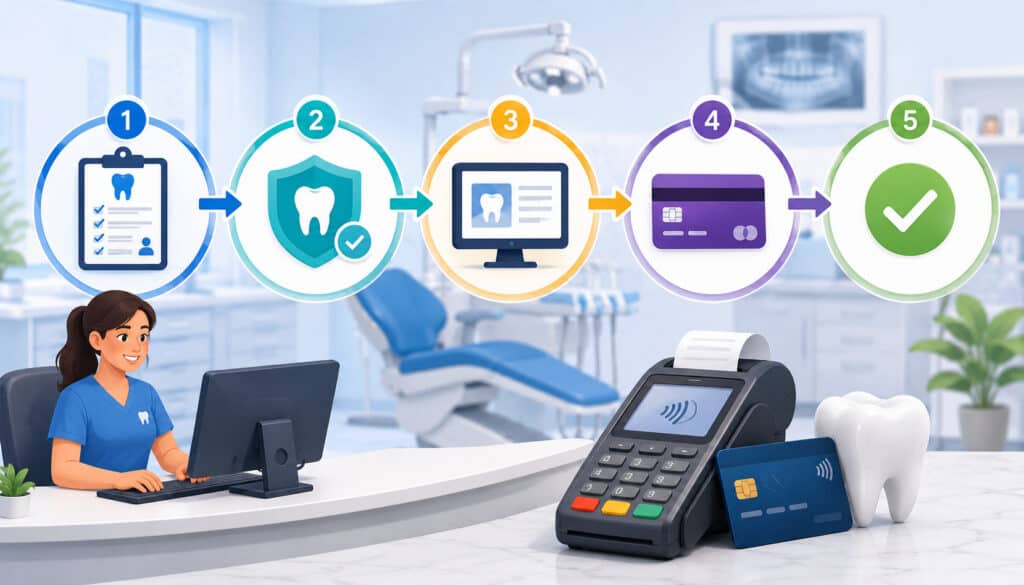
A successful dental payment processing setup works best when treated like an operational project, not a quick software purchase. The practice should review current workflows, identify gaps, compare providers, configure tools, train staff, test transactions, and monitor results after launch.
The following table gives a practical setup overview.
| Setup Step | What to Do | Why It Matters |
| Review current payment workflow | List all ways patients currently pay, including front desk, phone, portal, invoices, deposits, and payment plans | Helps identify missing tools, manual work, and security gaps |
| Choose a merchant account | Compare fees, support, funding times, reporting, contract terms, and dental-friendly features | Ensures the account fits dental billing needs |
| Select payment methods | Decide which cards, ACH, mobile wallets, payment links, and recurring options to accept | Gives patients convenient ways to pay |
| Configure hardware and software | Set up terminals, gateway, online payment tools, user permissions, and reporting | Creates a consistent payment environment |
| Connect billing workflows | Align payments with invoices, patient balances, insurance adjustments, and receipts | Reduces posting and reconciliation errors |
| Train the team | Teach staff how to take payments, issue refunds, handle failed payments, and protect data | Improves accuracy and patient communication |
| Test before launch | Run test payments, refunds, receipts, settlements, and reports | Catches problems before patients are affected |
| Review after launch | Monitor fees, disputes, failed payments, deposits, and staff feedback | Helps optimize the setup over time |
A setup checklist like this keeps the process organized. It also helps avoid common mistakes, such as choosing a provider before understanding what the office actually needs.
Step 1: Review Your Current Payment Workflow
Start by documenting every point where money enters or leaves the practice. This includes front-desk payments, online payments, insurance balance collections, treatment deposits, refunds, recurring payments, and account reconciliation.
Look at how patients currently pay. Are most payments taken in person? Are staff manually keying card numbers over the phone? Are mailed statements still driving many payments? Are online invoices available? Do patients have a way to pay from a portal?
Also review internal pain points. Common issues include delayed posting, unclear deposit matching, refund approval confusion, inconsistent receipts, and staff not knowing which balances are ready to collect.
Ask practical questions:
- Where do payment delays happen?
- Which payments require manual follow-up?
- Are card numbers ever written down or stored insecurely?
- Are payment plans tracked manually?
- Can staff easily match deposits to patient payments?
- Are refunds reviewed before being issued?
- Are reports useful for daily reconciliation?
This review gives you the foundation for choosing the right dental office merchant services. It also helps you decide which features are essential and which are optional.
Step 2: Choose a Merchant Account for Dental Practice Payments
Choosing a merchant account for dental practice payments requires more than comparing headline rates. Dental offices need reliable processing, clear reporting, strong support, secure tools, and payment features that match patient billing workflows.
Look closely at fees, but do not stop there. Ask about settlement timing, monthly charges, gateway fees, equipment costs, PCI-related fees, chargeback fees, ACH pricing, and contract terms. Review whether the pricing model is easy to understand and whether the provider can explain statement line items clearly.
Support matters as well. Dental teams need help when a terminal stops working, a batch does not settle, a refund is questioned, or an online payment link fails. Choose a provider that can support healthcare-style payment workflows, not just retail checkout.
Helpful features may include:
- Transparent dental credit card processing pricing
- Next-day or predictable funding options
- Online invoice and payment link tools
- ACH payment capability
- Recurring billing
- Secure card-on-file through tokenization
- Detailed reporting
- Refund controls
- User permissions
- Integration support
For more background on account selection, this guide on choosing the right merchant account for a dental practice may be useful.
Step 3: Select Payment Methods to Accept
Dental offices should offer payment methods that match patient expectations and office workflows. Most practices need in-person card payments, online payment options, and a way to support balances that are paid after the visit.
Card payments remain essential. Patients commonly use credit and debit cards for copays, balances, deposits, and treatment payments. Contactless payments and mobile wallets can make checkout faster and reduce manual card handling.
ACH can be useful for larger balances or recurring payments because bank payments may cost less than some card transactions. However, ACH also requires clear authorization, timing expectations, and failed-payment procedures.
Online invoices and payment links are especially useful for dental billing payments after insurance has been processed. Instead of calling patients repeatedly, the office can send a secure link connected to the patient balance or invoice.
Recurring billing can support orthodontics, implants, cosmetic dentistry, periodontal therapy, and in-house membership plans. It allows approved payments to run automatically according to an agreed schedule.
Common payment methods include:
- Chip and tap card payments
- Debit cards
- Mobile wallets
- ACH payments
- Secure online payment links
- Patient portal payments
- Recurring billing
- Card-on-file through tokenization
A good setup gives patients options while keeping staff workflows controlled and secure.
Key Features to Look for in Dental Office Merchant Services
Dental office merchant services should do more than process transactions. They should support the way dental practices estimate treatment, collect deposits, manage insurance balances, offer payment plans, issue refunds, and reconcile daily activity.
Security should be central. Look for encrypted terminals, tokenization, secure online payment pages, user access controls, and reporting that limits unnecessary exposure of sensitive data. Staff should not need to write down card details or store payment information manually.
Online payment links are also important. Many balances are collected after the patient leaves the office, especially when insurance determines the final patient responsibility. Secure links make it easier for patients to pay without calling the office.
Recurring billing and patient payment plans can improve affordability for larger treatments. The system should allow clear schedules, patient authorization, failed-payment handling, and accurate receipts.
Reporting tools are another priority. Your office should be able to view payments by date, provider, location, method, user, transaction status, refund, batch, and deposit. These reports help match payment activity to patient accounts and bank deposits.
Important features include:
- Secure terminals and gateway tools
- Online payment links
- Patient portal support
- Recurring billing
- Payment plan tools
- ACH processing
- Refund controls
- User permissions
- Deposit reporting
- Practice software compatibility
- Chargeback documentation support
A dental POS system may also be useful for practices that want a more structured front-desk checkout experience. Learn more about dental-focused payment tools on this products and services overview.
Online Payments and Patient Portals
Online payments help dental offices collect balances after the patient leaves the office. This is especially useful when insurance estimates change, claims are adjusted, or patients prefer to pay outside office hours.
A secure online payment option reduces phone-based collection work. Instead of taking card numbers manually, staff can send a payment link through an approved communication channel or direct the patient to a portal. The patient can review the amount, enter payment details securely, and receive a receipt.
Patient portals can also improve transparency. When patients can see balances, statements, and payment options in one place, they may be less likely to delay payment because they are unsure what they owe.
Online payments for dentists should be easy to use, mobile-friendly, secure, and connected to billing workflows whenever possible. If payments are not automatically posted, the system should at least provide clear reports for manual posting.
Recurring Payments and Payment Plans
Recurring payments for dental offices can support larger treatment plans by spreading approved payments over time. This is useful for orthodontics, implants, cosmetic dentistry, periodontal care, dentures, and membership-style programs.
The key is clarity. Patients should understand the total amount, payment schedule, payment method, start date, end date, cancellation terms, and what happens if a payment fails. Written authorization and accurate receipts help prevent misunderstandings.
A strong recurring billing setup should allow the office to manage active plans, pause or update payment methods, retry failed payments, and document each transaction. It should also help staff identify patients who need follow-up before balances become overdue.
Recurring billing is not just a convenience feature. It can support case acceptance by making treatment costs more manageable for patients. More guidance is available in this article on recurring billing for dental treatments and memberships.
Reporting and Reconciliation Tools
Reporting and reconciliation tools help dental offices confirm that payments were collected, posted, deposited, and recorded correctly. Without good reporting, staff may spend too much time comparing processor statements, bank deposits, patient ledgers, and daily reports.
Useful reports should show transaction date, payment method, patient reference, user, status, authorization, refund activity, fees, batch total, and deposit timing. This helps the team investigate discrepancies quickly.
Reconciliation is especially important when the practice accepts payments through multiple channels. In-office terminals, online payment links, ACH, recurring billing, and patient portal payments may settle differently. Reports should make those differences easy to understand.
Good reporting also helps management review payment trends. For example, you may discover that online invoices collect faster than mailed statements, or that ACH is helpful for larger recurring balances.
Payment Security and Compliance Considerations

Payment security should be built into every dental payment processing setup. Dental offices handle sensitive financial information alongside patient care workflows, so payment tools must reduce exposure and prevent unsafe habits.
A secure setup should use encrypted card terminals, secure gateways, tokenization, and controlled user permissions. Tokenization is especially useful for card-on-file and recurring billing because it replaces stored card details with a secure token. This means staff do not need to keep full card numbers in files, notes, spreadsheets, or images.
Avoid manual card storage. Writing card numbers on paper, saving them in patient notes, or storing them in unsecured files creates serious risk. Staff should use approved payment tools that capture, process, and store payment credentials securely.
User permissions are also important. Not every employee needs access to refunds, reports, stored payment tokens, or administrative settings. Role-based access helps reduce mistakes and misuse.
Refund controls should be documented. Practices should define who can approve refunds, how refunds are recorded, and how disputed refunds are handled. This protects both patients and the practice.
Security-focused workflows may include:
- Using chip, tap, or secure online entry instead of manual keying when possible
- Avoiding handwritten card data
- Requiring individual staff logins
- Limiting refund permissions
- Reviewing failed login attempts or unusual activity
- Keeping terminals updated
- Training staff on secure payment procedures
- Using approved systems for card-on-file
For deeper security guidance, this resource on PCI DSS requirements for dental practices can help offices understand practical payment protection steps.
How to Connect Payments With Dental Billing Workflows
Payments should connect smoothly with dental billing workflows. A payment system that works separately from billing can still create extra work if staff must manually match every transaction to patient accounts, treatment deposits, insurance balances, statements, and refunds.
Start with treatment estimates. When a patient accepts a treatment plan, the office should clearly identify expected insurance coverage, estimated patient responsibility, deposit requirements, and payment options. The payment setup should support deposits, partial payments, and scheduled payments when needed.
After treatment, the billing team may need to adjust balances based on insurance payments, claim denials, or plan limitations. The payment system should make it easy to collect the remaining patient balance through online links, portal payments, or stored payment authorization.
Receipts should be clear and consistent. Patients should receive documentation showing the amount paid, payment date, payment method, and what the payment applied to. This can reduce confusion when multiple family members, visits, or treatment phases are involved.
Refunds also need alignment with billing. A refund may relate to an overpayment, insurance adjustment, duplicate payment, or treatment change. Staff should record the reason, approval, amount, and patient account update.
A connected workflow should address:
- Treatment deposits
- Copays and same-day payments
- Insurance balance adjustments
- Patient responsibility estimates
- Online invoices
- Receipts and statements
- Refund approvals
- Payment plan tracking
- Failed payment follow-up
- Daily reconciliation
Common Fees Dental Offices Should Understand
Dental practices should understand payment processing fees before signing an agreement. Fees affect profitability, but they are not always easy to read on a monthly statement. A provider may charge transaction fees, monthly fees, gateway fees, ACH fees, chargeback fees, PCI-related fees, batch fees, equipment costs, and other service charges.
Transaction fees usually apply to card payments. These may include a percentage of the transaction, a per-transaction amount, or both. The cost can vary based on card type, entry method, rewards card usage, and pricing model.
Gateway fees may apply when using online payments, virtual terminals, payment links, or recurring billing. ACH fees may be charged per bank payment or as a percentage. Chargeback fees may apply when a patient disputes a transaction.
Equipment costs should also be reviewed carefully. Some practices buy terminals, while others lease them. Long equipment leases can become expensive and difficult to exit.
Common fee categories include:
- Card transaction fees
- Per-transaction authorization fees
- Monthly account fees
- Gateway fees
- ACH processing fees
- Batch fees
- PCI-related fees
- Chargeback fees
- Retrieval or dispute documentation fees
- Terminal or equipment costs
- Statement fees
- Early termination fees
Settlement timing also matters. Faster funding may help cash flow, but some providers charge extra for it. Practices should understand when funds will arrive and whether weekends, holidays, batches, or transaction types affect deposit timing.
Common Mistakes to Avoid During Setup
One of the biggest mistakes dental offices make is choosing merchant services only by the lowest advertised rate. Fees matter, but a cheap setup can become costly if it lacks online payments, reliable support, secure tools, reporting, or integration with office workflows.
Another mistake is ignoring remote payment options. If patients can only pay at the front desk or by phone, billing teams may spend more time collecting balances after insurance has processed. Online payment links and portal payments can reduce that burden.
Weak staff training can also cause problems. Even a strong system can fail if employees do not know how to process refunds, handle partial payments, send payment links, update stored payment methods, or reconcile batches.
Insecure card storage is another serious issue. Dental offices should not write card numbers on paper, store them in patient notes, or keep them in spreadsheets. Secure dental payments require approved tools and consistent procedures.
Common mistakes include:
- Choosing only by low rates
- Not reviewing contract terms
- Skipping online payment options
- Ignoring ACH and recurring billing
- Using outdated terminals
- Not training staff thoroughly
- Allowing shared logins
- Storing card details manually
- Lacking refund approval rules
- Not testing payment links before launch
- Failing to reconcile daily
- Not reviewing monthly statements
A careful dental office merchant account setup should prevent these problems before they affect patients or cash flow.
Best Practices for a Smooth Merchant Services Setup
A smooth Merchant Services Setup for Dental Offices depends on preparation, documentation, staff training, and ongoing review. The best payment setup is not just installed; it is managed.
Start by documenting payment policies. Staff should know when payment is due, how deposits are collected, how payment plans are approved, how refunds are handled, and how patients receive receipts. Clear policies help the team communicate consistently.
Next, configure user permissions. Limit access based on job role. For example, front-desk staff may need to accept payments and send links, while managers may control refunds, reports, and account settings.
Test all payment channels before relying on them. Run sample transactions, refunds, voids, payment links, recurring schedules, ACH payments, receipts, and reports. Confirm that staff understand what each status means.
Train the full team, not just the office manager. Anyone who discusses balances, treatment deposits, or payment plans should understand the basics of the payment workflow.
Best practices include:
- Document payment policies
- Use secure terminals and payment links
- Enable online payment options
- Train staff on each payment scenario
- Set user permissions by role
- Reconcile payments daily
- Review processor statements monthly
- Monitor chargebacks and disputes
- Keep refund approvals documented
- Test recurring billing before launch
- Update procedures when workflows change
- Keep patient communication clear and consistent
A good payment setup should improve both patient experience and internal control. Patients get convenient ways to pay, while staff get reliable tools and clearer reporting.
FAQs
What is Merchant Services Setup for Dental Offices?
Merchant Services Setup for Dental Offices is the process of setting up the tools, accounts, hardware, software, and procedures needed to accept patient payments securely. It may include a merchant account, card terminals, online payment links, ACH processing, recurring billing, patient portal payments, reporting tools, and staff permissions.
How do dental offices set up payment processing?
Dental offices set up payment processing by reviewing current payment workflows, choosing a merchant account, selecting accepted payment methods, configuring terminals and online tools, training staff, testing transactions, and connecting reports to billing and reconciliation processes.
Do dental practices need a merchant account?
Most dental practices need a merchant account or payment processing relationship to accept card payments, online payments, and other electronic payment methods. The right merchant account should support secure processing, clear funding, transparent fees, and practical dental billing needs.
What payment methods should dental offices accept?
Dental offices should usually accept credit cards, debit cards, contactless payments, mobile wallets, online payment links, and ACH payments. Practices that offer larger treatment plans may also benefit from recurring billing and patient payment plans.
Are online payments secure for dental offices?
Online payments can be secure when processed through approved payment pages, encrypted gateways, tokenized payment tools, and controlled staff access. Dental offices should avoid collecting card numbers through unsecured messages, paper forms, or manual storage.
Can dental offices offer recurring payments?
Yes, dental offices can offer recurring payments when patients authorize scheduled charges. Recurring payments can support orthodontics, implants, cosmetic dentistry, periodontal care, memberships, and larger treatment plans.
What fees should dental practices expect?
Dental practices may see transaction fees, monthly fees, gateway fees, ACH fees, chargeback fees, PCI-related fees, batch fees, equipment costs, and possible early termination fees. Fees vary by provider, payment method, transaction type, and pricing model.
How can dental offices reduce payment disputes?
Dental offices can reduce payment disputes by using clear treatment estimates, written payment authorizations, detailed receipts, transparent refund policies, secure payment tools, and accurate account notes.
Conclusion
Merchant Services Setup for Dental Offices requires more than selecting a card terminal. A strong setup includes secure payment tools, the right merchant account, flexible payment methods, online payment options, recurring billing, staff training, reporting, reconciliation, and clear payment policies.
When planned carefully, dental payment processing setup improves patient convenience, protects payment data, reduces billing friction, and supports healthier cash flow. It also helps front-desk teams, billing staff, office managers, and administrators work with more accuracy and confidence.
The best approach is practical: review your workflow, choose tools that match your practice, train your team, test every payment channel, and keep improving the system over time.